An internet server is made a JLMahJongg server by uploading a small PHP script. This script handles all game communication and administration requests. The server needs to be available via HTTP(S) (and optionally SSH, FTP, and/or SFTP).
JLMahJongg game administration uses a version of the Player Sets and Data display. A non-administration version of this display is used to log in or out of the game. The game should have at least two administrators. The administrators control who has game access and the user’s initial account information. Administrators should password-protect their accounts.
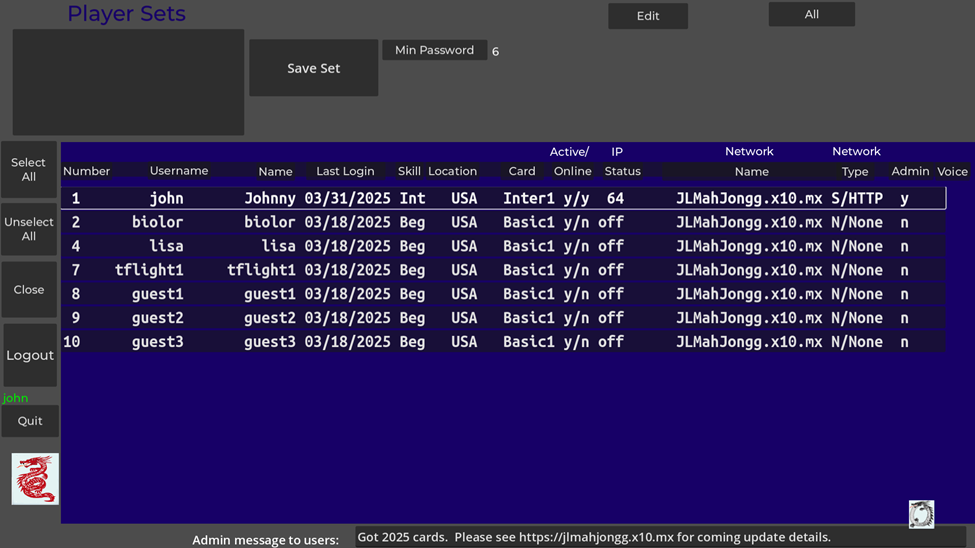
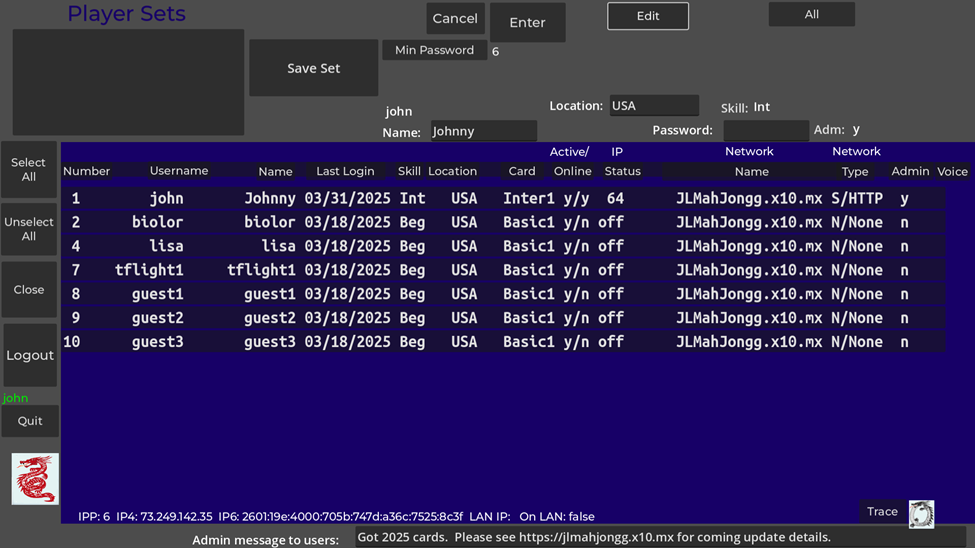
An example administration display is shown in Figure D5. The blue area shows the administration data for all current users. You can sort on a column by clicking on the column heading. The columns are:
- Number: A unique ID number assigned to each user. Numbers 0 and 1 are always administrators.
- Username: A unique username for each user. Case matters except for the first character.
- Name: A name for the user (not used except on this display and in the lobby)
- Last Login: Last date of login/use of the game
- Skill: Skill level to help match players with similar skill and speed
- Active: Indication if the user is active (played recently)
- IP Status: User’s internet address types available (6=IPv6, 4=IPv4, L=On Same Local Area Network (LAN), off=not currently accessible)
- Network Name: Name assigned to a Server or Private Direct Internet connection
- Network Type/Protocol: User’s last network type and protocol
- Admin: Is the user an admin?
- Voice: Voice status: upload availability (R-Restricted, P-Public) and currently downloaded (S-Specific, C-Custom). Restricted upload availability means a user’s uploaded voice can only be used for their voice. Public upload availability means a user’s voice can be used for their voice or other player’s voices (real or computer). You can’t use someone’s public voice for your voice (either local or sent to other players). A downloaded voice file that is Specific means that that voice can only be used for the specific user that uploaded it (It was uploaded as Restricted). A downloaded voice file that is Custom means that voice file has public use so you can use it for other player’s voices (the user that uploaded it has it marked with Public availability).
Game administration functions are controlled by the buttons in the upper right area of Figure D5. These functions are:
- Min Password – The minimum required number of password characters for non-admin users is set here between 0 and 6. If set to 0, no password is required.
The “All” button will have the name of the selected group, or “All” if all players are selected (no group). Pressing this button or the “Close” button returns to the lobby display.
App Updates: The app does not automatically update itself; however, the administrator can set the latest version number on the web site so users are notified if a newer version is available. If available, the new version number is shown above the logo at the lower left of the lobby. An administrator can also post a message to all users using the bottom of the Figure D5 display. The message is displayed in the lobby when a user logs in.
The first time you press a button, the button press is not recognized. After this first button press, all future button presses are received.
Sometimes, rarely, the app shows a green MahJongg button that indicates you have Mah Jongg, even though you don’t. If you press the green button when you don’t have Mah Jongg, you will be dead.
Playing with multiple players over the internet sometimes hangs. Until we fix the root cause, you can try “unhanging” by having the host press the “Clear” button.
A player quitting before or in the middle of a game may break the game for the remaining players.
iOS devices (iPhone and iPad) can’t record voices (game engine limitation). Voice recording might not be available on the browser and/or macos versions due to breaking of the audio interface.
Some older Apple devices can’t use the latest browser version of the app. An JLMahJongg version based on the long-term-stable Godot 3 engine needs to be used in this case. The Godot 3 version (B) uses the GLES2 graphics library. The Godot 4 version (A) uses the Vulcan graphics library.
Can’t logout of the SSH server and login again without restarting app. When enabling a new network, you need to restart the app (working on fixing). Also need to restart the app after changing most network parameters.
The SSH server sometimes fails to connect – need to restart app and try again.
If IP address changes, you may need to restart the app. Sometimes devices using a direct connection are using different IP address types and cannot connect (IP4 and IP6). Restarting both devices and/or rebooting usually fixes this problem.
The SSH and SFTP interfaces have not been tested with more than 2 real players. The HTTP interface sometimes hangs in a game with multiple real players.
It has been reported that the game can hang during the Charleston, even with a single real player.
Joining as a guest may not always work and might hang the game.