An internet server is made a JLMahJongg server by uploading a small PHP script. This script handles all game communication and administration requests. The server needs to be available via HTTP(S).
JLMahJongg game administration uses a version of the Player Sets and Data display. A non-administration version of this display is used to log in or out of the game. The game should have at least two administrators. The administrators control who has game access and the user’s initial account information. Administrators should password-protect their accounts.
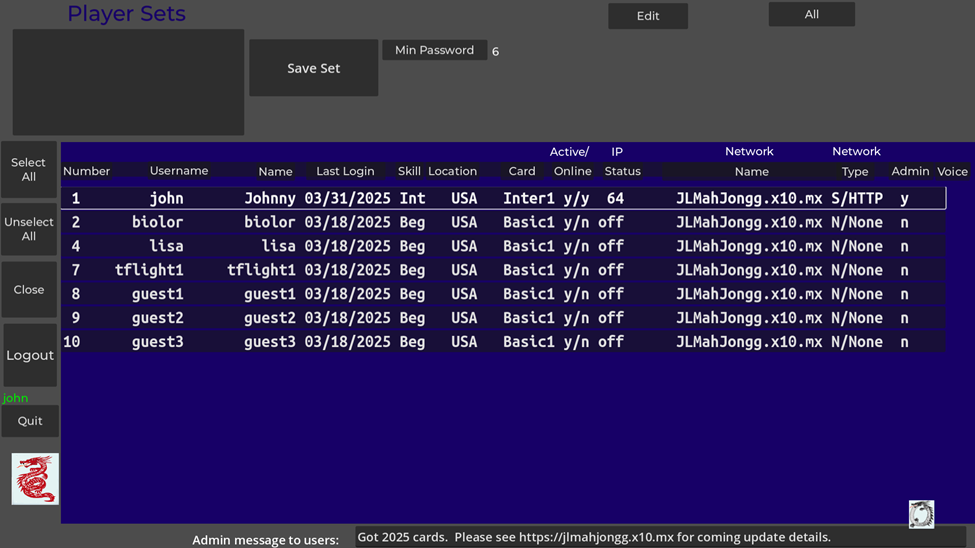
An example administration display is shown in Figure D5. The blue area shows the administration data for all current users. You can sort on a column by clicking on the column heading. The columns are:
- Number: A unique ID number assigned to each user. Numbers 0 and 1 are always administrators.
- Username: A unique username for each user. Case matters except for the first character.
- Name: A name for the user (not used except on this display and in the lobby)
- Last Login: Last date of login/use of the game
- Skill: Skill level to help match players with similar skill and speed
- Active: Indication if the user is active (played recently)
- IP Status: User’s internet address types available (6=IPv6, 4=IPv4, L=On Same Local Area Network (LAN), off=not currently accessible)
- Network Name: Name assigned to a Server or Private Direct Internet connection
- Network Type/Protocol: User’s last network type and protocol
- Admin: Is the user an admin?
- Voice: Voice status: upload availability (R-Restricted, P-Public) and currently downloaded (S-Specific, C-Custom). Restricted upload availability means a user’s uploaded voice can only be used for their voice. Public upload availability means a user’s voice can be used for their voice or other player’s voices (real or computer). You can’t use someone’s public voice for your voice (either local or sent to other players). A downloaded voice file that is Specific means that that voice can only be used for the specific user that uploaded it (It was uploaded as Restricted). A downloaded voice file that is Custom means that voice file has public use so you can use it for other player’s voices (the user that uploaded it has it marked with Public availability).
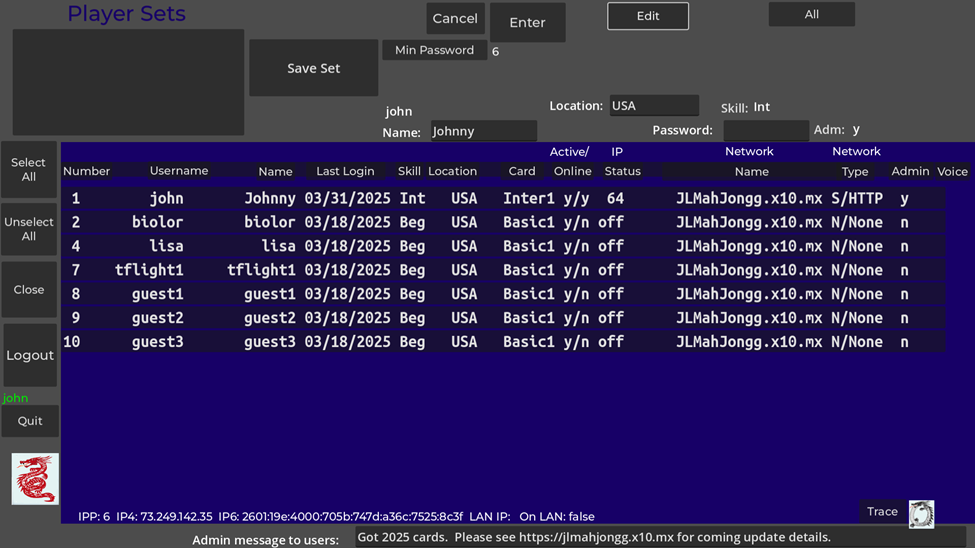
Game administration functions are controlled by the buttons in the upper right area of Figure D5. These functions are:
- Min Password – The minimum required number of password characters for non-admin users is set here between 0 and 6. If set to 0, no password is required.
The “All” button will have the name of the selected group, or “All” if all players are selected (no group). Pressing this button or the “Close” button returns to the lobby display.
App Updates: The app does not automatically update itself; however, the administrator can set the latest version number on the web site so users are notified if a newer version is available. If available, the new version number is shown above the logo at the lower left of the lobby. An administrator can also post a message to all users using the bottom of the Figure D5 display. The message is displayed in the lobby when a user logs in.
A player quitting before or in the middle of a game may break the game for the remaining players.
Some Apple devices can’t use the latest browser version of the app. An older version (B) based on the long-term-stable Godot 3 engine needs to be used in this case. The older version has almost the same functionality as the newer version.
If IP address changes, you may need to restart the app.
Joining as a guest may not always work and might hang the game.
Changing Table types during a game may cause the previous game’s shown tiles and discards to be shown in the next game.
The “AutoDone” setting might change by itself during a game if you go back to settings and then return.
Have not tested lately with more than 3 real players or any guests.
If you change network type or card type, you may have to exit the app and restart for the change to take effect.